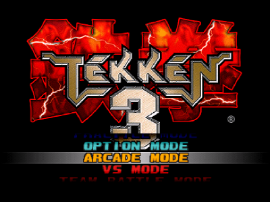
Tekken 3 Online is still one of the easiest ways to return to a fighting game that shaped a whole generation. Even now, players search for Tekken 3 Online because they want fast access, simple controls, and a clean way to enjoy a classic without a long setup. If that sounds like you, the goal is not just to launch the game. The goal is to make the session feel smooth, readable, and fun from the first round.
Tekken 3 earned its reputation for a reason. Official PlayStation history notes that the game pushed the series forward with faster movement, side-stepping, and a cast that became iconic for many fans. The home version also added modes such as Tekken Force and Tekken Ball, which gave players more reasons to stay with the game after the arcade novelty wore off. That is why the game still has real pull today. People are not only chasing nostalgia. They are coming back to a fighter that still feels sharp.
This guide explains how to get the best Tekken 3 Online experience in a browser, which device works best, what settings matter most, and how to fix the common issues that break momentum. It also shows where our site fits in. If you want a direct place to start, Tekken3Online.com gives you a focused route into the game page without extra clutter.
That mix of speed, personality, and low friction is exactly what keeps casual readers turning into repeat players.
Why Tekken 3 still matters
Before you worry about setup, it helps to understand why the game keeps attracting new clicks. Tekken 3 was first released in arcades in 1997 and reached PlayStation in 1998. Over time, it became one of the key games people point to when they talk about the rise of 3D fighters on console. A big part of that success came from how it balanced depth and speed. It rewarded practice, but it also felt exciting within minutes.
The roster helped too. Jin Kazama became a major face of the series, while characters such as Hwoarang, Eddy Gordo, Bryan Fury, and Ling Xiaoyu gave the game more style and variety. Tekken 3 was easy to watch, easy to talk about, and hard to master. That combination is powerful, and it is one reason Tekken 3 Online still has strong search demand.
The game also keeps showing up in modern official spaces. PlayStation included Tekken 3 in the PlayStation Classic lineup in 2018, and Sony released a PS4 and PS5 version on October 21, 2025 with modern features such as rewind, quick save, and video filters. That matters because it shows the game still has value beyond nostalgia pages and fan memory. Tekken 3 Online benefits from that same ongoing interest.
The best device for Tekken 3 Online
If you want the short answer, desktop is the best place to play it. A laptop or desktop browser usually gives you stronger performance, more stable controls, and a better view of spacing. Tekken is not a slow puzzle game. It asks for quick reads, clean movement, and fast reactions. A bigger screen makes those reads easier.
Mobile can work for a quick test, but it is rarely the best long session choice. Touch controls cover too much of the screen, hand position gets awkward, and timing feels less consistent. If all you want is a short look, mobile is fine. If you want to enjoy the game for more than a few minutes, move to desktop.
Your browser matters too. Stick with a current version of Chrome, Edge, or Safari. Old builds can create strange input lag, scaling issues, or full screen problems. You do not need a gaming PC for Tekken 3 Online, but you do need a stable browser and enough free system resources to avoid frame drops.
How to get a smoother browser session
Most people lose quality before the match even starts. They open too many tabs, rush through loading, or ignore the screen layout. A few small habits improve browser play right away.
- Close heavy background tabs first. Streaming video, large web apps, and extra game tabs can eat memory and CPU time.
- Wait for the session to settle. Do not judge performance in the first second after launch. Let the page load fully before you test movement.
- Use fullscreen when possible. Fullscreen will not change the game logic, but it often makes the action easier to track and the controls feel more natural.
- Play on a stable connection. Even when a session is mostly local in the browser, the initial load still depends on a clean network path.
- Refresh once if the first launch feels wrong. A simple reload can clear a one-time load issue faster than random trial and error.
These steps sound basic, but they solve a large share of first-run problems. Tekken 3 Online is at its best when the browser has room to breathe and the player is not fighting the page.
Controls, input, and comfort
Control quality is a big part of whether browser play feels fun or frustrating. Keyboard play is possible, especially if you already know your preferred layout. For many players, though, a controller is the better choice. A controller makes directional movement easier to repeat and keeps your hands in a more natural position during longer sessions.
If you use a keyboard, choose a layout that keeps movement and attack inputs close together. The exact mapping is personal, but the rule is simple: do not force your hands to travel too far. Fast games punish awkward finger movement. If you use a controller, test each direction and button before you commit to a real run. A bad input setup can make the session feel worse than it really is.
Comfort matters more than some players admit. Sit where your wrists can stay loose. Put the game on the main display if you use multiple screens. Avoid playing through a weak Bluetooth connection if you notice delayed input. Small physical details shape your sense of control, and that sense of control is central to smooth play.
Common problems and easy fixes
Even a good browser session can hit a few rough spots. The good news is that most issues have simple causes.
The game feels slow
This usually points to background load, an old browser build, or weak device performance. Close extra tabs, restart the browser, and try again. If the device is already struggling, lower your expectations for a long session and use a stronger machine later.
The screen looks too small
Use fullscreen first. Tekken 3 Online becomes much easier to read when characters, movement space, and effects are not squeezed into a small frame. On desktop, fullscreen is usually the fastest quality upgrade.
Inputs feel inconsistent
Check your keyboard or controller before you blame the game. Reconnect the controller, test directions again, and make sure no other software is catching your input. Browser play depends on a clean chain between device, browser, and page.
The first load seems broken
Refresh the page once. If the second load works, the first issue was likely temporary. If the page still fails, then it makes sense to check whether the problem is with the browser, the device, or the site route itself.
Where our website helps
Many pages that promise this game bury it behind clutter, weak page structure, or confusing links. That is why we built a cleaner path. On Tekken3Online.com, the goal is direct access, readable page structure, and simple support pages around the main session. The site is designed for players who want to jump into the game quickly and stay focused on the match, not fight through noise.
That focused structure also helps search intent. When someone looks for Tekken 3 Online, they usually want one of three things: a fast way to launch, a clear explanation of how it works, or help fixing a rough session. Our site is built around those needs. The game page stays central, and the blog exists to answer practical questions like this one.
A smart way to use it today
The best mindset is simple: treat browser play as the fastest route to a classic session. Tekken 3 Online is great for quick rounds, for testing character interest, and for revisiting the feel of the game without a heavy setup. It is also a useful entry point for younger players who know the series name but never spent time with this specific game.
At the same time, keep your expectations realistic. Browser play is convenient, but convenience does not erase the limits of your device, browser, or control setup. If you keep those factors in mind, the browser version can still feel surprisingly strong.
Final thoughts
Tekken 3 has lasted because it is more than a museum piece. It is fast, readable, character rich, and easy to enjoy in short bursts. That is exactly why Tekken 3 Online continues to matter. With the right device, a stable browser, fullscreen, and a decent input setup, you can get a session that feels much better than many people expect.
If you want the cleanest starting point, begin on desktop, load the page fully, and keep the setup simple. When you are ready, you can start from Tekken3Online.com and jump straight into a smoother Tekken 3 Online session.